What Internet Speed Do You Need for IPTV in 2026? Bandwidth Guide for HD, 4K & 8K
Upgrading to an Internet Protocol Television (IPTV) service is one of the smartest decisions a modern entertainment lover can make. Delivering over 50,000 live channels, premier sports broadcasts in fluid 60 FPS, and massive on-demand libraries spanning 120,000+ movies and series, premier platforms like Strong 8k tv deliver an entertainment universe that traditional cable companies simply cannot match.
Yet, because IPTV streams content entirely over digital internet protocols rather than closed coaxial lines or satellite transponders, your broadband connection serves as the direct physical lifeline of your viewing experience.
The most common question prospective cord-cutters ask is straightforward: "What internet speed do I actually need for IPTV?"
The answer, however, is rarely as simple as a single advertised number. Many subscribers with high-tier "300 Mbps" or "1 Gigabit" fiber broadband still experience frustrating buffering, stuttering video, and sudden resolution drops. Why? Because streaming live high-bitrate television requires far more than raw headline download speed. It demands low latency, minimal jitter, zero packet loss, and unthrottled routing stability.
This comprehensive 2026 guide demystifies the technical physics of streaming bandwidth. We break down the exact internet speeds required for Standard Definition (SD), High Definition (HD), 4K Ultra HD, and next-generation 8K broadcasts, provide a multi-device household bandwidth calculator, explain why fast connections can still freeze, and outline step-by-step optimizations to guarantee butter-smooth, uninterrupted viewing.
Internet Speed Requirements for IPTV Streaming Guide
The Anatomy of Internet Speed for Continuous Live Streaming
When consumers purchase an internet subscription, Internet Service Providers (ISPs) advertise a single prominent metric: maximum downstream bandwidth (e.g., "100 Mbps Download"). While this number sounds impressive, it only represents the theoretical width of your digital pipeline—not the quality, consistency, or reliability of the data flowing through it.
To understand why an IPTV stream succeeds or fails, you must understand the four distinct pillars of network performance:
┌────────────────────────────────────────────────────────────────────────┐
│                   THE 4 PILLARS OF IPTV STREAMING SPEED                │
├───────────────────┬───────────────────┬────────────────────────────────┤
│ Metric            │ What It Measures  │ Ideal Value for 4K / 8K IPTV   │
├───────────────────┼───────────────────┼────────────────────────────────┤
│ 1. Bandwidth      │ Pipeline capacity │ 35–50+ Mbps dedicated headroom │
│ 2. Latency (Ping) │ Packet round-trip │ Under 30ms (Max 60ms)          │
│ 3. Jitter         │ Latency variance  │ Under 5ms (Max 12ms)           │
│ 4. Packet Loss    │ Dropped data      │ Exactly 0.0% (Max 0.2%)        │
└───────────────────┴───────────────────┴────────────────────────────────┘
1. Download Bandwidth (Throughput)
Download bandwidth is the volume of data your connection can transfer per second, measured in Megabits per second (Mbps). For video playback, your bandwidth must comfortably exceed the stream's encoding bitrate. If a live 4K channel transmits at 25 Mbps, an internet connection delivering only 20 Mbps will cause the stream to freeze within seconds.
2. Latency (Ping)
Latency is the time (in milliseconds) required for a single data packet to travel from your streaming device to the media server and return. In online gaming and live television, low latency is critical. If your ping exceeds 100ms, establishing real-time handshakes for live video fragments becomes sluggish, delaying channel zapping and increasing initialization wait times.
3. Jitter (Packet Arrival Variance)
Jitter measures the inconsistency of packet arrival times. In a healthy connection, data packets arrive at regular, predictable intervals (e.g., every 10ms). If network congestion causes packets to arrive erratically—some in 5ms, others in 90ms—the media player's hardware video decoder runs out of chronological frames to render, resulting in micro-stutter and audio popping. For flawless 4K IPTV, your jitter must remain under 5 milliseconds.
4. Packet Loss (Dropped Data)
Packet loss occurs when network routers drop data packets along the transit path due to congestion or signal interference. In standard web browsing, dropped packets are simply re-requested in the background without user interruption. In live 4K IPTV streaming, however, lost packets cannot always be resent in time. Even a tiny packet loss rate of 0.5% to 1.0% causes immediate pixelation, garbled blocky artifacts, or complete video stalls.
Why Bursty Downloads Differ from Continuous Unicast Streams
When you browse a website or download an operating system update, your computer pulls data in massive, erratic bursts: it utilizes 100% of available bandwidth for a few seconds, finishes the download, and sits idle.
Live IPTV streaming, by contrast, relies on a continuous, non-stop unicast stream. For two straight hours during a championship football match, your streaming box must pull a steady, unrelenting stream of 25 to 35 Megabits of data every single second without a microsecond of interruption. If your Wi-Fi experiences a two-second signal fade, playback halts instantly.
Resolution-by-Resolution Bandwidth Requirements Breakdown
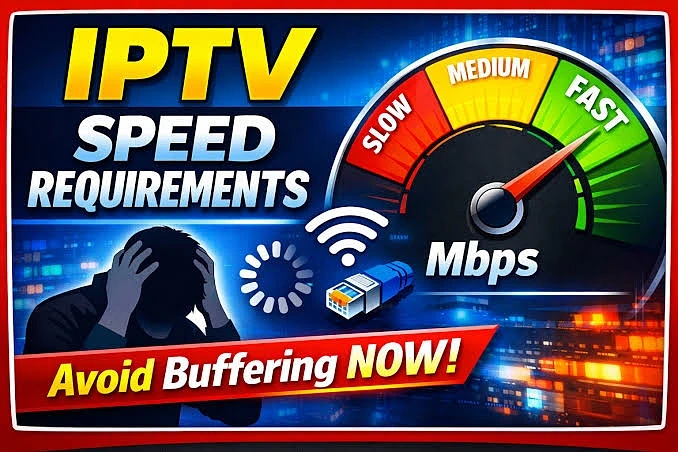
Not all television channels demand the same bandwidth. A local news broadcast in 720p requires a fraction of the data consumed by an Ultra HD 4K live football match broadcast at 60 frames per second. Below is the definitive technical breakdown across all major video standards:
 Recommended Internet Speeds for SD, HD, Full HD and 4K IPTV
Standard Definition (SD - 480p)
- Native Resolution: 720 x 480 pixels
- Average Stream Bitrate: 1.5 – 3.0 Mbps
- Minimum Dedicated Internet Speed: 5 – 8 Mbps
- Household Context: SD is the legacy standard of early cathode-ray tube (CRT) televisions and early digital broadcasting. Today, SD is rarely used for primary channels, but remains prevalent for vintage international feeds, regional radio broadcasts, and legacy archival content. A modest 10 Mbps home connection handles SD streams with ease.
High Definition (HD - 720p & 1080i)
- Native Resolution: 1280 x 720 (Progressive) or 1920 x 1080 (Interlaced)
- Average Stream Bitrate: 4.0 – 8.0 Mbps
- Minimum Dedicated Internet Speed: 15 – 20 Mbps
- Household Context: 720p and 1080i represent the baseline resolution of traditional broadcast television (such as standard cable networks like Fox, ABC, and ESPN). These streams provide sharp images on screens up to 43 inches and operate reliably over standard home Wi-Fi networks.
Full High Definition (FHD - 1080p @ 30 FPS / 60 FPS)
- Native Resolution: 1920 x 1080 pixels
- Average Stream Bitrate: 8.0 – 15.0 Mbps (HEVC) / 14.0 – 20.0 Mbps (H.264)
- Minimum Dedicated Internet Speed: 25 – 35 Mbps
- Household Context: Full HD at 60 FPS is the true sweet spot for live sports broadcasting. The 60 frames-per-second frame rate provides fluid motion for fast-moving action like basketball and hockey. On a premier provider like Strong 8k tv, 1080p 60FPS feeds deliver exceptional sharpness with broad hardware compatibility across all modern smart televisions.
Ultra High Definition (4K UHD - 2160p @ 60 FPS HDR)
- Native Resolution: 3840 x 2160 pixels (Over 8.3 million pixels per frame)
- Average Stream Bitrate: 20.0 – 35.0 Mbps (HEVC H.265 / AV1)
- Peak Burst Bitrate: Up to 55.0 Mbps during rapid motion scenes
- Minimum Dedicated Internet Speed: 50 – 75 Mbps per active screen
- Household Context: True 4K broadcasts feature four times the pixel density of 1080p, delivering breathtaking stadium detail, vibrant HDR10 / Dolby Vision color palettes, and crystal-clear text. Because 4K feeds frequently burst up to 50+ Mbps during high-motion camera pans, your internet must provide comfortable headroom above the baseline average.
Next-Generation Ultra 8K (4320p UHD)
- Native Resolution: 7680 x 4320 pixels (Over 33 million pixels per frame)
- Average Stream Bitrate: 50.0 – 85.0 Mbps (AV1 / High-Profile HEVC)
- Peak Burst Bitrate: Up to 120.0 Mbps
- Minimum Dedicated Internet Speed: 100 – 150+ Mbps per screen
- Household Context: The pinnacle of modern television fidelity, 8K streaming delivers photographic realism on giant 75-inch, 85-inch, and 98-inch OLED and Micro-LED displays. Streaming 8K content demands enterprise-grade fiber connectivity and modern hardware decoding processors like the Nvidia Shield TV Pro.
Multi-Device Household Bandwidth Calculator
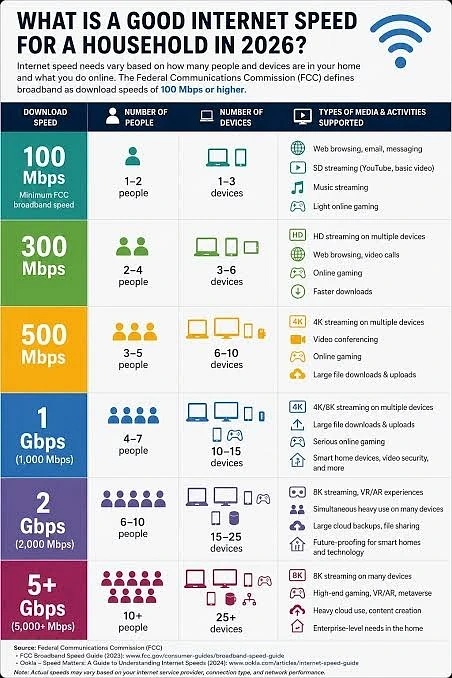
In modern households, a television is never the only device using the internet. When you settle down to watch a football game on your living room television, several other internet activities are likely running in the background simultaneously:
- A family member watching Netflix or YouTube in a bedroom (15–25 Mbps).
- A child playing online games on a PlayStation 5 or Xbox (5–10 Mbps with low ping demands).
- A home computer running cloud backups (Google Drive, iCloud, OneDrive) or software updates (20–50 Mbps).
- Smart home security cameras uploading continuous 1080p video feeds to cloud servers (5–10 Mbps upstream).
- Mobile smartphones browsing social video feeds like TikTok and Instagram (10–20 Mbps).
 Multiple Devices Streaming IPTV on the Same Internet Connection
To calculate the true broadband tier your household requires, apply this mathematical formula:
$$ ext{Required Bandwidth} = sum ( ext{Active IPTV Streams} imes ext{Dedicated Headroom}) + ext{Background Household Load}$$
Real-World Household Scenarios & Recommended Broadband Tiers:
Scenario A: The Single Viewer / Studio Apartment
- Active Streaming: 1 primary 4K television (35 Mbps).
- Background Devices: 1 smartphone + 1 laptop (15 Mbps).
- Total Dedicated Requirement: ~50 Mbps.
- Recommended ISP Plan: 50 Mbps to 100 Mbps.
Scenario B: The Connected Couple
- Active Streaming: 1 primary 4K living room TV + 1 bedroom 1080p TV (35 Mbps + 20 Mbps = 55 Mbps).
- Background Devices: 2 smartphones + remote work video conferencing (25 Mbps).
- Total Dedicated Requirement: ~80 Mbps.
- Recommended ISP Plan: 100 Mbps to 200 Mbps.
Scenario C: The Active Family Household (3–4 Members)
- Active Streaming: 2 concurrent 4K TVs streaming sports and movies + 1 tablet streaming live TV (35 Mbps + 35 Mbps + 15 Mbps = 85 Mbps).
- Background Devices: Online multiplayer gaming, smart home cameras, cloud backups, and mobile social media (50–75 Mbps).
- Total Dedicated Requirement: ~150 Mbps.
- Recommended ISP Plan: 250 Mbps to 500 Mbps.
Scenario D: The Ultimate High-Tech Smart Home
- Active Streaming: Multiple 4K and 8K screens, multi-view sports viewing on Strong 8k tv, 4K security monitoring, and high-frequency cloud syncing.
- Total Dedicated Requirement: ~300+ Mbps.
- Recommended ISP Plan: 500 Mbps to 1 Gigabit (1,000 Mbps) Fiber.
Wi-Fi vs. Wired Ethernet: The Throughput Reality
Many subscribers assume that if they purchase a 300 Mbps broadband plan from their ISP, their Smart TV automatically receives 300 Mbps over Wi-Fi. In real-world living rooms, this assumption is completely false.
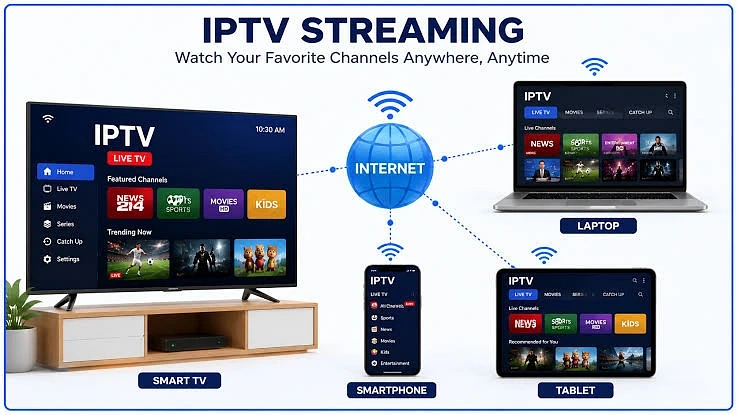
 Wi-Fi and Ethernet Connection for IPTV Streaming
The Hidden Pitfalls of Home Wi-Fi:
- Physical Obstacles & Distance: High-frequency 5 GHz Wi-Fi waves travel poorly through drywall, brick walls, solid wood cabinetry, and metal appliances. Every wall between your router and TV cuts throughput by 30% to 50%.
- Radio Frequency Interference: Microwave ovens, baby monitors, cordless phones, Bluetooth soundbars, and neighboring apartment Wi-Fi networks broadcast on the identical wireless frequencies, causing microsecond packet collisions.
- Budget TV Wi-Fi Antennas: Television manufacturers often cut costs by embedding budget 1x1 SISO Wi-Fi antennas into the back chassis of smart televisions. These antennas struggle to maintain stable links even 20 feet away from a router.
The Power of Direct Cat6 Ethernet:
Connecting your streaming box directly to your router via a shielded Cat6 or Cat7 Ethernet cable eliminates 99% of wireless streaming problems:
- Zero Electromagnetic Interference: Physical copper cabling is completely shielded from external radio noise.
- Near-Zero Latency & Jitter: Ping times over direct Ethernet are typically under 1ms, with virtually non-existent jitter.
- Zero Packet Loss: Every packet arrives in chronological order, allowing media decoders to render 4K 60FPS sports without dropping a single frame.
Crucial Hardware Warning for Smart TV Owners: Nearly all modern Smart TVs (including $2,000+ OLED models from Samsung, LG, and Sony) are manufactured with legacy 10/100 Mbps Ethernet ports rather than modern Gigabit (1000 Mbps) interfaces. While 100 Mbps is mathematically sufficient for 4K streams, the internal network controller chip can introduce high processing latency under heavy loads. If your TV's built-in Ethernet port struggles, plugging an inexpensive USB 3.0 to Gigabit Ethernet adapter into the television's USB 3.0 port frequently triples real-world throughput and slashes latency.
If you are experiencing persistent freezing despite an apparently fast connection, follow the 12 proven solutions in our dedicated guide on how to fix IPTV 4K buffering problems.
How to Accurately Test Your Internet Connection for IPTV
Standard internet speed tests (such as the default Ookla Speedtest) can be highly misleading for IPTV users. Ookla tests connection speed by opening multiple simultaneous TCP data streams to a local server hosted by your own ISP, often located just a few miles from your house. This produces an artificially inflated speed score that does not reflect real-world international video routing.
 Testing Internet Speed for IPTV Streaming
To test your connection accurately for continuous video streaming, use these superior diagnostic tools:
1. Cloudflare Speed Test (speed.cloudflare.com)
Cloudflare is one of the world's largest internet transit backbones. Their speed test evaluates real-world internet routing performance, measuring:
- Sustained Download Throughput across various file sizes (100 KB, 1 MB, 10 MB, 25 MB).
- Loaded Latency: How your ping reacts when your network is actively downloading heavy video streams.
- Jitter & Packet Loss Graphs: Visual timelines showing whether your connection drops data during sustained transfers.
2. Fast.com (Powered by Netflix)
Fast.com connects directly to Netflix's commercial content delivery servers. Because many commercial ISPs attempt to throttle high-bandwidth video traffic while leaving speed test sites unthrottled, Fast.com reveals whether your ISP is actively throttling video streams. Click "Show more info" after the initial test to view your loaded latency and upload metrics.
3. Waveform Bufferbloat Test (waveform.com/tools/bufferbloat)
Bufferbloat is a critical network flaw where your router excessively buffers data packets during high traffic, causing latency to spike from 20ms to 400ms+. The Waveform test grades your router's performance from A+ to F. If your home network receives a grade of C or lower, high-bitrate live television will freeze whenever another family member uses the internet.
Why IPTV Can Buffer Even With Fast Internet
One of the most perplexing experiences for cord-cutters is seeing a 500 Mbps speed test result while an IPTV channel freezes every thirty seconds. If your download speed is blazing fast, why does the stream buffer?
There are four primary culprits behind this phenomenon:
1. Poor ISP International Peering Routes
Your home ISP may provide lightning-fast speeds to local regional servers, but possess cheap, congested transit routes to international data centers where high-tier broadcast servers are located. When your stream crosses an overburdened peering exchange point, data packets bottleneck, causing buffering regardless of your local 500 Mbps speed.
2. Primetime ISP Bandwidth Throttling
During peak television viewing hours (typically between 8:00 PM and 11:00 PM on Friday, Saturday, and Sunday nights), millions of households stream video simultaneously. To prevent neighborhood distribution nodes from crashing, some commercial ISPs deploy automated Deep Packet Inspection (DPI) algorithms to throttle high-bandwidth UDP streaming traffic. Using a premium Virtual Private Network (VPN) running the modern WireGuard protocol encrypts your data, preventing your ISP from identifying and throttling your IPTV stream.
3. Underpowered Streaming Hardware
A 4K stream encoded in 10-bit H.265 (HEVC) requires immense hardware processing power to decompress in real time. Inexpensive generic Android boxes or older 1st-generation streaming sticks often possess weak processors that overheat and max out at 100% CPU capacity. The video freezes not because the internet is slow, but because the device's graphics silicon cannot render the frames fast enough. Upgrading to a modern device like the Amazon Fire TV Stick 4K Max, Google Chromecast 4K, or Nvidia Shield TV Pro provides instant relief. Review our step-by-step tutorial on how to set up IPTV on Android TV & Google TV to configure hardware decoding properly.
4. Oversold, Low-Tier IPTV Server Infrastructure
If you subscribe to a budget, low-quality IPTV provider, their server infrastructure simply cannot handle concurrent viewer spikes. When thousands of users tune in to watch a major sports event, their single-server nodes suffer complete CPU exhaustion. No amount of local internet speed can fix a stream that is stalling at the broadcaster's server.
This is why Strong 8k tv engineers its broadcast delivery on enterprise-grade Anti-Freeze 10.0 architecture, deploying distributed server clusters across North America and Europe with redundant load balancing to guarantee zero game-time freezing.
5 Practical Ways to Optimize Your Network for IPTV
Follow these five practical network optimizations to squeeze every drop of stability from your existing internet subscription:
- Prioritize Your TV with Quality of Service (QoS): Log in to your router settings (typically
192.168.1.1) and locate the Quality of Service (QoS) menu. Set the MAC address of your primary streaming TV or Android box to "Highest Priority," ensuring other household downloads never steal its bandwidth. - Switch to High-Performance Public DNS Resolvers: Replace your ISP's sluggish default DNS servers with ultra-fast public resolvers:
- Cloudflare:
1.1.1.1(Primary) and1.0.0.1(Secondary) - Google Public DNS:
8.8.8.8(Primary) and8.8.4.4(Secondary)
- Cloudflare:
- Lock Wi-Fi to 5 GHz with 80 MHz Channel Width: Separate your router's 2.4 GHz and 5 GHz networks into distinct SSIDs. Connect your TV exclusively to the 5 GHz band, and set the channel width in your router to 80 MHz on an uncongested wireless channel (channels 36–48 or 149–161).
- Deploy a Mesh Wi-Fi Network or MoCA Adapters: If your router is located far from your living room television, avoid cheap Wi-Fi repeaters, which cut bandwidth in half. Instead, install a tri-band Wi-Fi 6 Mesh system (such as eero Pro or TP-Link Deco) or use MoCA (Multimedia over Coax) adapters to convert existing coaxial wall outlets into rock-solid Gigabit Ethernet ports.
- Test With an IPTV Trial Before Committing: Never pay for an annual subscription without thoroughly testing channel stability during peak evening hours. Learn the exact testing protocol in our guide on how to test an IPTV service before buying a subscription.
Internet Speed & Streaming Performance Diagnostic Matrix
| Video Stream Quality | Codec Format | Average Bitrate | Minimum Dedicated Speed | Recommended Household Speed | Best Connection Type |
|---|---|---|---|---|---|
| SD (480p) | H.264 / MPEG-2 | 2 – 3 Mbps | 5 Mbps | 25 Mbps Plan | 2.4 GHz Wi-Fi / Ethernet |
| HD (720p) | H.264 (AVC) | 5 – 7 Mbps | 15 Mbps | 50 Mbps Plan | 5 GHz Wi-Fi / Ethernet |
| Full HD (1080p30) | H.264 / H.265 | 8 – 12 Mbps | 25 Mbps | 100 Mbps Plan | 5 GHz Wi-Fi / Ethernet |
| FHD Sports (1080p60) | H.265 (HEVC) | 12 – 18 Mbps | 35 Mbps | 150 Mbps Plan | Cat6 Ethernet (Recommended) |
| 4K Ultra HD (2160p) | H.265 / HEVC | 20 – 30 Mbps | 50 Mbps | 200 – 300 Mbps Plan | Cat6 Ethernet / Wi-Fi 6 |
| 4K Sports (2160p60 HDR) | HEVC / AV1 | 28 – 38 Mbps | 75 Mbps | 300 – 500 Mbps Plan | Direct Cat6 Ethernet |
| 8K Ultra HD (4320p) | AV1 / HEVC | 50 – 85 Mbps | 120 Mbps | 500 – 1000 Mbps (Gigabit) | Gigabit Cat6/Cat7 Ethernet |
Frequently Asked Questions
Final Verdict
High-speed internet is the foundation of modern television entertainment, but raw bandwidth is only one piece of the puzzle. To enjoy uninterrupted, stadium-grade live sports, cinema-quality movies, and international television, your connection must deliver stable throughput, low latency, and zero packet loss.
For a single viewer, a dedicated connection speed of 35 to 50 Mbps is the gold standard for pristine 4K streaming. For modern family households with multiple screens, gaming consoles, and smart devices running concurrently, an internet tier of 100 Mbps to 300 Mbps provides the necessary headroom to keep every stream playing smoothly.
Pair your optimized home network with the world-class broadcast reliability of Strong 8k tv. Browse our flexible pricing plans, explore our directory of 50,000+ live channels & 120,000+ VODs, or check out our comprehensive device installation guides to start streaming with unmatched quality today.